A browser needs evidence that it reached the website named in the URL. A TLS certificate includes an identity and a public key. The browser checks several properties before trusting that identity.
Web Security · Lesson 3
Certificates
Learn to check the name, validity dates, and issuer shown by a TLS certificate.
Looking at the Names
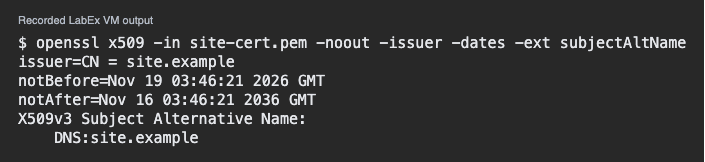
Save the public practice certificate as site-cert.pem. It is a self-signed teaching sample. Use OpenSSL to print the issuer, validity dates, and subject alternative names. The -noout option suppresses the encoded certificate.
$ openssl x509 -in site-cert.pem -noout -issuer -dates -ext subjectAltName
The subject alternative name section lists the DNS names covered by the sample. Look for DNS:site.example. A browser checks the name from its URL against the names in the certificate.
The only listed name is site.example. Which URL matches this name?
Checking the Dates
notBefore and notAfter describe the time range in which the certificate can be used. Compare those dates with the time of your test. A clock problem can also affect the check. Dates alone are insufficient to verify a certificate.
The current time is after notAfter. What should you investigate?
Checking Trust
The issuer names who signed the certificate. Browsers normally check signatures along a chain that leads to a trusted authority. The issuer label printed by OpenSSL is a field you can inspect. Verifying the chain is a separate operation. A practice certificate may be intended only for a lab.
The name and dates match, but the browser does not trust the signer. What is still missing?
Lesson complete
You finished Certificates
You can now read three useful parts of a certificate check.
Match the URL host to a covered name.
Compare the current time with the certificate's dates.
Treat chain trust as a separate check.
Keep your learning progress
Create a free account to save this lesson and continue learning on any device.
Create a free account