A user can sign in under an ordinary account and later need to do a task that requires more permissions. On a system that uses sudo, the user can ask to run a command as a different account. The record of that request can show which permissions were requested and what the system decided.
Security Logs · Lesson 3
sudo Events
Learn how sudo records identify who requested a command, which account it would run as, and whether it was allowed.
Finding the Two Accounts
The simulated records below use account for the account that made the request and target for the account the requested command would run as. The root account has system administration privileges. A sudo request can name a different target account, such as backup.
t=09:15:10Z source=sudo host=web-01 account=alex target=root
command=systemctl status nginx decision=allowed session=42
The second line continues the record. Here alex made the request and asked to run the command as root.
In a record with account=sam target=backup, who asked to run the command and as which account?
Reading the Requested Command
The command field names the command covered by the request. In the sample, systemctl status nginx asks to display the current status of the Nginx web service. Another record might show systemctl restart nginx, a request to stop and start that service again. Both mention the same service and describe different actions.
Which request asks to change the running state of the web service?
Reading the Decision
The policy is the set of rules sudo uses to decide whether to allow a request. In our samples, decision=allowed means the policy permitted that request. decision=denied means sudo refused it.
t=09:16:00Z source=sudo host=web-01 account=alex target=root
command=systemctl restart nginx decision=denied session=42
An allowed decision describes permission. If you need the command result, look for a result record when the system provides one.
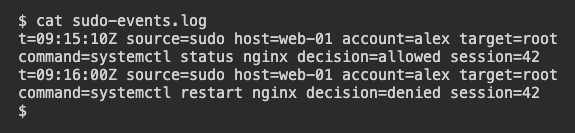
Compare the requested commands and decisions in these two simulated records.
What does the second example say happened to the restart request?
Keeping the Login Account in View
Both examples name alex as the requester and include session=42. This number refers to the login session, the period of activity after signing in. It helps you find the surrounding login records. The target in each example applies to that one command request. Use the requester and target fields together when describing it.
Which summary fits the first sample?
Lesson complete
You finished sudo Events
You can now read a sudo record without confusing a permission decision with a command result.
Identify the requesting and target accounts.
Use the command field to describe the specific request.
Distinguish permission granted from permission denied.
Keep the login session in view when describing a request.
Keep your learning progress
Create a free account to save this lesson and continue learning on any device.
Create a free account