A host firewall can allow or block incoming network traffic by properties such as source address, protocol, and destination port. Start by deciding what traffic the service needs.
Linux Hardening · Lesson 5
Host Firewalls
Learn to read a simple host firewall policy and plan checks from the relevant locations.
Reading an Example Policy
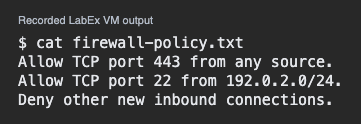
The following simplified policy describes one host. The slash in 192.0.2.0/24 describes a range of IPv4 addresses. In this sample, 192.0.2.44 is inside that range and 198.51.100.8 is outside it.
Allow TCP port 443 from any source.
Allow TCP port 22 from 192.0.2.0/24.
Deny other new inbound connections.
Port 443 serves the public site. Port 22 is reserved for the maintenance network. The default describes connections outside the two allowed rules.
Which new connection matches the maintenance rule?
Checking Both Policy and Listener
A permitted connection can still fail if no program is listening. Likewise, a healthy listener can be unreachable through a path the firewall denies. Read the policy and verify the listener separately.
The rule allows port 443, but the host has no listener there. What should you check?
Planning a Safe Verification
When reviewing a controlled change, keep a legitimate maintenance path available. Test the allowed path from the maintenance network. Test that an approved location outside that network does not get through. Record the source, target and expected result for each test.
Which pair tests the intended SSH restriction?
Lesson complete
You finished Host Firewalls
You can now reason about host firewall rules alongside service state.
Match a rule to the protocol, destination, and source.
Check that the allowed service is listening.
Verify both expected access and expected restriction.
Keep your learning progress
Create a free account to save this lesson and continue learning on any device.
Create a free account