An integrity check asks whether a file still matches a reference. Check contents and metadata separately. Contents are the bytes inside the file. Metadata includes details such as its access permissions.
System Auditing · Lesson 3
File Integrity
Learn to compare a file's contents and permissions using a hash and metadata.
Recording a Content Hash
In an empty practice folder, create a tiny configuration file. The redirection replaces an existing file of that name, so use a new folder.
$ printf '%s\n' 'mode=preview' > site.conf
$ sha256sum site.conf
The first field is the hash, a fixed-length value calculated from the file's bytes. Use the same method on the same file later. A changed hash indicates different input bytes.
The SHA-256 value changes after the file is edited. What does the comparison show?
Recording Its Permissions
On Linux, stat -c prints selected metadata. The %a field prints the numeric permission mode and %n prints the name.
$ stat -c '%a %n' site.conf
The exact starting mode can depend on how the file was created. Record it alongside the content hash so you can compare both properties later.
The hash matches the reference and stat reports a different mode. What changed according to these checks?
Testing a Mode Change
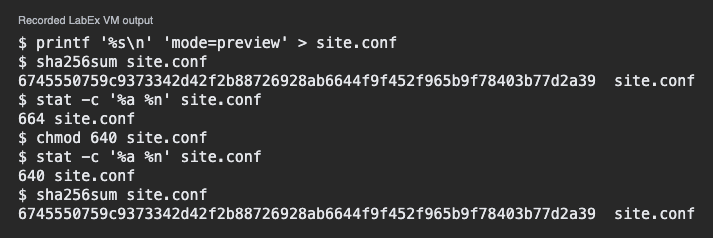
The next command changes the permissions of this disposable file to 640. It grants the owner read and write access and the group read access. Run the two checks again and compare the results.
$ chmod 640 site.conf
$ stat -c '%a %n' site.conf
$ sha256sum site.conf
The mode should report 640 and the content hash should match the first measurement.
Which check would detect a later edit to mode=preview inside the file?
Lesson complete
You finished File Integrity
You can now compare file contents and access permissions independently.
Record a SHA-256 content hash.
Read the mode using stat.
Verify the effect of a permission change.
Keep your learning progress
Create a free account to save this lesson and continue learning on any device.
Create a free account