A baseline is a trusted record of expected file properties at a known point. A later integrity check can compare the current files with it and report differences.
System Auditing · Lesson 4
Integrity Baselines
Learn to interpret an integrity report and choose when to approve a new baseline.
Reading a Difference Report
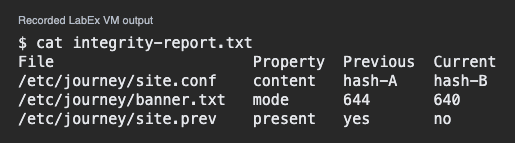
This simulated excerpt compares a host against its last approved state.
File                      Property  Previous  Current
/etc/journey/site.conf    content   hash-A    hash-B
/etc/journey/banner.txt   mode      644       640
/etc/journey/site.prev    present   yes       no
The first row shows a change to bytes. The second shows a permissions change. The third reports that a previously tracked file was absent during the check.
Which row reports changed access permissions?
Checking the Reference
The report is only useful if the earlier reference was trusted. Preserve its identity and creation date. An earlier file captured while something was already wrong can yield a misleading comparison. Ask which approved state the baseline represents.
Which baseline is most useful for reviewing today's configuration?
Reviewing Before Updating
Compare each difference with an approved change and verify the service result. If the banner mode change was planned but the configuration change was not, review them separately. Update the reference after authorized differences are understood and approved. Keep a record of the older reference.
The banner mode change is approved and the site.conf change is unexplained. What should happen before accepting a new baseline?
To create and compare an integrity reference in a practice environment, try File Integrity Monitoring.
Lesson complete
You finished Integrity Baselines
You can now use a baseline as evidence for a specific comparison.
Distinguish content, mode, and presence in a report.
Check that the reference represents a trusted state.
Review unexpected differences before accepting a new reference.
Keep your learning progress
Create a free account to save this lesson and continue learning on any device.
Create a free account