You have an image for a web server. To start the server, use docker run to create and start a container from that image. Start with a command that finishes quickly so you can see when control returns to the terminal.
Docker · Lesson 3
docker run
Learn how Docker creates and starts containers from images with docker run.
Running a Short Task
BusyBox is a small image with basic Linux commands. In the example below, echo prints a message. Put the image reference before the command you want to run inside the container. Docker normally downloads the image if it is missing locally. The $ marks the terminal prompt. If Docker needs to pull the image first, it may print download messages before the line shown here.
$ docker run busybox:1.36 echo Hello
Hello
You see the output in your terminal. After echo finishes, the container stops and your prompt returns.
What runs inside the container in this example?
Naming the Container
Use --name before the image reference to give a container a name you can recognize later. This command names a short task report.
$ docker run --name report busybox:1.36 echo Ready
An existing container keeps its name after it stops. In the same Docker environment, use a name that is available when creating another container.
Report has finished, but the container still exists. You want a second container using the same image. What can you change?
Starting a Server in the Background
Images can specify a default command. The nginx:alpine image starts a web server when you omit a command after the image name. Add -d to detach, which lets the server run while your prompt returns.
$ docker run -d --name web nginx:alpine
Docker prints a container ID, a long identifier for the container it started. You will check whether the server is still running in the next lesson.
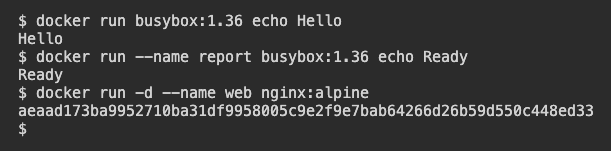
The short tasks print their messages in the terminal. The detached server returns a container ID.
Docker prints an ID and the prompt returns. What does detach let you do?
Recognizing a New Container
Each successful docker run creates a new container. If you use the server image again with a free name, Docker creates a second container. The first one keeps its own name and state.
Web is running. What does docker run -d --name demo nginx:alpine do if demo is available?
For practice starting a container and observing its output, try Your First Docker Lab.
Lesson complete
You finished docker run
You can now read a docker run command and predict what Docker will create.
Identify the image and the optional command that runs in the container.
Use
--nameto identify a container later.Describe what happens when a short task finishes.
Use
-dto return to the prompt while a server runs.
Keep your learning progress
Create a free account to save this lesson and continue learning on any device.
Create a free account