A container named preview has exited. The container list gives you its state and exit code. To find out what the program reported, look at the output Docker collected from that container.
Docker · Lesson 6
docker logs
Learn how to read output collected from a container and use it to choose a troubleshooting step.
Choosing a Container
Pass the container name to docker logs. The command can read retained output from a stopped container that still exists. In this example, a short task tried to read a file at /site/title.txt before it stopped.
$ docker logs preview
cat: can't open '/site/title.txt': No such file or directory
Here, cat is the program that tried to read the file. The message names the path that program could not find inside the container.
Both preview and report used the same image. Which command reads the output from preview?
Reading the Message in Context
Logs contain messages the program wrote. A startup message can tell you that the program began listening for requests. An error can tell you which action the program could not complete. The example points to a missing path inside preview. A useful next check is whether the container was supposed to have a file at that exact path. The message gives you a place to look.
What does the missing-file message establish?
Looking at Recent Output
For a container with many lines of output, use --tail followed by a number. Docker returns up to that many lines from the end of the collected output. You can start with a small number and read more if the first error is above those lines.
$ docker logs --tail 5 web
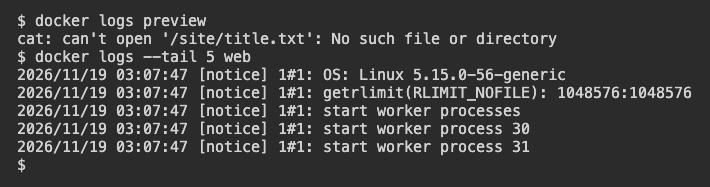
The two commands read different containers. In the LabEx run, preview reports the missing file and web reports that Nginx started.
You want to see just the most recent two lines available from web. Which command fits?
Handling an Empty Result
Docker can only show output it collected. A command can run quietly, or the program may write its messages to a file that Docker does not collect. If docker logs succeeds and prints nothing, use docker ps -a to check the container's state. An empty log result alone leaves that state unknown.
The saved task named cleanup has no log lines. You want to know whether it is still running or has already exited. What would answer that?
Lesson complete
You finished docker logs
You can now use a container's output to decide what to check next.
Read collected output from a named container, including one that has exited.
Use the program's message to locate the reported problem.
Limit the output with
--tail.Use a separate check when the logs leave a question open.
Keep your learning progress
Create a free account to save this lesson and continue learning on any device.
Create a free account