A browser opens a page from a web server running in Docker. Where is the server running, and what happens to the page when that server stops? Start with the program that answers the browser.
Docker · Lesson 1
Containers
Learn what a Docker container runs and how it relates to the machine running Docker.
A Program Inside a Container
A web server is a program that answers requests for pages. Imagine that your browser and a small web server named web are on the same machine. Docker runs the server in a container, which gives the program its own view of files and other resources. The course uses prepared examples, so you can follow along without installing Docker.
When the browser asks for a page, what sends back the page content?
The Container and Its Host
The machine running the containers is called the host. With Docker running Linux containers on Linux, the programs run as processes on that Linux host. A process is a running program. Each container can see a restricted set of resources, even though several containers share the same host. On Docker Desktop, Linux containers run inside a Linux virtual machine managed by Docker.
Two Linux containers run on the same Linux host. What does that tell you?
Starting from an Image
Docker creates a container from an image, a package that supplies the program and the files it needs. You can use the same web server image to create web and demo. When started, each container runs a separate process for the same server program. You can stop either container independently.
You stop demo while web is still running. What happens to web?
Checking a Service Before and After It Stops
Suppose the browser is already set up to send requests to web. Before you stop it, the browser receives the page. After you stop it, a fresh request no longer gets the page from that server. The image is still available for another container. A server needs a running program and a way for the browser to reach it. A later lesson shows how to connect the browser to a container.
The image is still available, but web has stopped. What is needed for web itself to answer again?
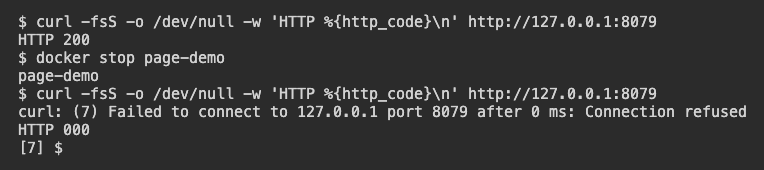
In this LabEx example, a container named page-demo serves the page. The first curl request gets HTTP 200. After the container stops, a fresh request fails. Curl prints 000 because it received no HTTP response.
Lesson complete
You finished Containers
You can now explain how a container runs a program on a host.
Identify the program that responds to a browser request.
Explain how containers can share a host.
Describe how one image can supply multiple containers.
Use a fresh request to observe whether a previously reachable server is still answering.
Keep your learning progress
Create a free account to save this lesson and continue learning on any device.
Create a free account