A deployment record helps another person connect a user-visible result to a change. Start with the time, environment, source revision, and artifact. Add the result of the check and any action taken afterward.
Deployment · Lesson 6
Deployment Records
Learn to reconstruct a deployment and rollback from a short release timeline.
Naming What Changed
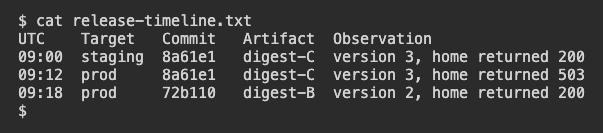
This practice record tracks one rollout. The identifiers are shortened for readability.
UTC    Target   Commit   Artifact  Observation
09:00  staging  8a61e1   digest-C  version 3, home returned 200
09:12  prod     8a61e1   digest-C  version 3, home returned 503
09:18  prod     72b110   digest-B  version 2, home returned 200
HTTP 200 means a successful response. HTTP 503 reports that the service was unavailable for that request. Keep the check and address with the result in a real record.
Which row records the first observed production behavior for digest-C?
Explaining the Rollback
The last row shows a return to digest-B. The version check and the homepage result describe the outcome after the rollback. They give no detailed cause for the earlier failure. Keep any hypothesis separate until you have supporting evidence.
What can you say about the 09:18 result?
Handing Off the Record
A new reviewer needs to reproduce the scope of the observation. Include how it was measured, a timestamp with its time zone, and a link to the producing build when available. State what to inspect next if the cause remains unknown.
Which detail would help the next reviewer repeat the homepage check?
Recording What Actually Ran
A tag in a deployment note may move after a release. If the service already reports version 2, record the artifact that is actually running as well as its readable label. Those two values let someone compare the release later even if its registry tag moved.
The release note says site:2. What additional detail makes later comparison more reliable?
Lesson complete
You finished Deployment Records
You can now read a release timeline and hand it to someone else.
Identify the environment, revision, and artifact in a record.
Describe a rollback using the observed result.
Preserve enough detail for the next check.
Keep your learning progress
Create a free account to save this lesson and continue learning on any device.
Create a free account