A check that fails is easier to interpret when each stage has one job. Preparation makes inputs and tools available. A build creates output. A test checks an expectation against the source or output.
Continuous Integration · Lesson 4
Builds and Tests
Learn to distinguish preparation, building, and testing by running a small page check locally.
Preparing the Input
In an empty practice folder, write an example page. The redirection replaces index.html if the file exists, so use a fresh practice directory.
$ printf '%s\n' '<h1>Welcome</h1>' > index.html
In a CI job checkout would provide the page. Some projects also install dependencies, which are the libraries or tools required to run their build or tests.
The page is missing before the command that copies it. Which stage should you investigate first?
Building the Output
Copy the page to a directory used for the finished site.
$ mkdir -p dist
$ cp index.html dist/index.html
The -p option lets mkdir succeed when the directory already exists. Copying makes a separate file in the output directory. Subsequent tests can inspect this output.
Which file is ready to package after the copy succeeds?
Testing the Page
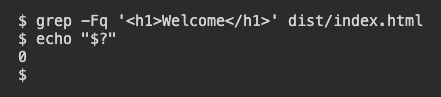
Run this check immediately after building. The -F option looks for literal text and -q keeps the result quiet. The shell stores the last command's exit code in $?. Zero means the text was found. One means there was no matching line.
$ grep -Fq '<h1>Welcome</h1>' dist/index.html
$ echo "$?"
Expect 0. The test checked for the exact text in the built file. It had no expectation about colors, browser rendering, or response time.
This test passes. Which conclusion follows?
Lesson complete
You finished Builds and Tests
You can now tell what each stage of a small CI check proves.
Prepare the input before running the build.
Identify the file produced by the build.
Interpret the exit code and the exact scope of the test.
Keep your learning progress
Create a free account to save this lesson and continue learning on any device.
Create a free account