A build artifact is a file or collection of files saved from a run for later use. Examples include a test report or a site archive. Keeping the run and revision with the artifact helps a reviewer tell which source produced it.
Continuous Integration · Lesson 6
Build Artifacts
Learn to connect a file produced by CI to its run and source revision.
Packaging an Output Directory
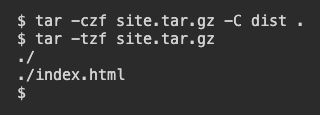
Use the practice folder where dist contains the built page. This example makes a compressed archive, a single file holding the directory's contents. It replaces any existing archive of the same name in the current folder.
$ tar -czf site.tar.gz -C dist .
$ tar -tzf site.tar.gz
In the first command, -c creates the archive, -z compresses it, and -f names the output file. -C dist . tells tar to start in dist. The second command uses -t to list what was packed. Find ./index.html before making the archive available.
Which command checks that the page was included?
Linking an Artifact to a Run
A workflow can upload the finished archive. The run page shows which revision it built. Two artifacts named site.tar.gz can be different if they came from different revisions. Use the run and revision together when choosing which file to download.
Runs 41 and 42 contain site.tar.gz. Which identifies the package for the revision you reviewed?
Distinguishing an Archive and a Container Image
A site archive contains files that you can unpack. A container image includes the packaged filesystem and settings Docker uses to start a container. A workflow can publish an image to an image registry. Record the image reference with the source revision if the image is the item you intend to run.
The next stage expects to start a container from a registry. Which output should it reference?
Lesson complete
You finished Build Artifacts
You can now identify a build artifact and trace where it came from.
Package and inspect the built files.
Check the producing run and source revision.
Choose a file artifact or a container image according to what the next step needs.
Keep your learning progress
Create a free account to save this lesson and continue learning on any device.
Create a free account