
はじめに
この実験では、C++ の文字列について学びます。文字列の定義と初期化の方法、および文字列関数の使い方を学びます。
コンテンツプレビュー
C++ は 2 種類の文字列型をサポートしています。
- 文字列は、
NULL文字'\0'(16 進数の0)で終端するchar配列です。これは、文字列または C スタイルの文字列とも呼ばれます。 - C++98 で導入された新しい
stringクラス。
「高度な」string クラスが推奨されます。なぜなら、それははるかに使いやすく理解しやすいからです。ただし、多くの古いプログラムでは C 文字列が使用されており、多くのプログラマーは完全な制御と効率のために「低レベル」の C 文字列も使用しています。さらに、コマンドライン引数などの場合、C 文字列のみがサポートされています。したがって、両方の文字列型を理解する必要がある場合があります。
- 文字列の宣言と初期化
- 文字列の入出力
- 文字列の操作
文字列の宣言と初期化
string クラスを使用するには、<string> ヘッダーをインクルードして、「using namespace std」を行います。
文字列を文字列リテラルで宣言および初期化したり、空の文字列に初期化したり、別の文字列オブジェクトで初期化することができます。たとえば、
#include <string>
using namespace std;

string str1("Hello");  // 文字列リテラルで初期化する(暗黙的な初期化)
string str2 = "world"; // 文字列リテラルで初期化する(代入演算子を介した明示的な初期化)
string str3;           // 空の文字列に初期化する
string str4(str1);     // 既存の文字列オブジェクトからのコピーにより初期化する
文字列の入出力
例
/* 文字列クラスの入出力をテストする */
#include <iostream>
#include <string>     // 文字列クラスを使用するにはこのヘッダが必要
#include <limits>
using namespace std;  // <string> を使用するためにも必要

int main() {
   string message("Hello");
   cout << message << endl;

   // 文字列を入力する(空白で区切られた単語)
   cout << "Enter a message (no space): ";
   cin >> message;
   cout << message << endl;

   cin.ignore(numeric_limits<streamsize>::max(), '\n');
   // 改行までの cin をクリアする(<limits> ヘッダが必要)

   // 文字列を 1 行入力する
   cout << "Enter a message (with spaces): ";
   getline(cin, message);  // cin からの入力を message に読み込む
   cout << message << endl;
   return 0;
}
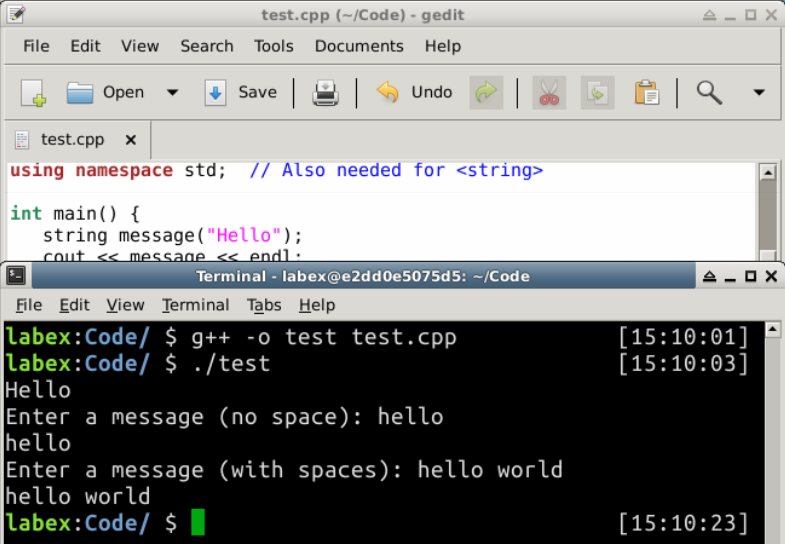
出力:
Hello
Enter a message (no space): hello
hello
Enter a message (with spaces): hello world
hello world
注記:
- 文字列クラスを使用するには「
#include <string>」が必要で、stringはstd名前空間の下に定義されているため「using namespace std」も必要です。 - 「
cin >> aStr」はcin(キーボード)から単語(空白で区切られた)を読み取り、文字列変数aStrに代入します。 getline(cin, aStr)はcinから全行('\n'まで)を読み取り、aStrに代入します。'\n'文字は破棄されます。cinをクリアするには、ignore(numeric_limits<streamsize>::max(), '\n')関数を使用して'\n'までのすべての文字を破棄します。numeric_limitsは<limits>ヘッダにあります。
文字列操作
文字列の長さを確認する:
string str("Hello, world");
// どちらも文字列の長さを返す
cout << str.length() << endl;  // 12
cout << str.size()   << endl;  // 12
空の文字列かどうかを確認する:
string str1("Hello, world");
string str2;                   // 空の文字列
// 文字列が空かどうかを確認する
cout << str1.empty() << endl;  // 0 (false)
cout << str2.empty() << endl;  // 1 (true)
別の文字列からコピーする:代入演算子「=」を単に使用する。
string str1("Hello, world"), str2;
str2 = str1;
cout << str2 << endl;   // Hello, world
別の文字列と連結する:プラス「+」演算子、または複合代入演算子「+=」を使用する。
string str1("Hello,");
string str2(" world");
cout << str1 + str2 << endl;  // "Hello, world"
cout << str1 << endl;         // "Hello,"
cout << str2 << endl;         // " world"
str1 += str2;
cout << str1 << endl;  // "Hello, world"
cout << str2 << endl;  // " world"
string str3 = str1 + str2;
cout << str3 << endl;  // "Hello, world world"
str3 += "again";
cout << str3 << endl;  // "Hello, world worldagain"
文字列の個々の文字を読み取り/書き込む:
string str("Hello, world");
// インデックスの文字を返す。インデックスは 0 から始まる。インデックスの境界チェックを行う。
cout << str.at(0) << endl;  // 'H'
cout << str[1] << endl;     // 'e'
cout << str.at(str.length() - 1) << endl;  // 'd'

str.at(1) = 'a';  // インデックス 1 に書き込む
cout << str << endl;  // "Hallo, world"

str[0] = 'h';
cout << str << endl;  // "hallo, world"
部分文字列を抽出する:
string str("Hello, world");
// 開始インデックスからの部分文字列を返す
cout << str.substr(2, 6) << endl;  // "llo, w"
別の文字列と比較する:
string str1("Hello"), str2("Hallo"), str3("hello"), str4("Hello");
cout << str1.compare(str2) << endl;   // 1   'e' > 'a'
cout << str1.compare(str3) << endl;   // -1  'h' < 'H'
cout << str1.compare(str4) << endl;   // 0

// 演算子 == または!= を使用することもできる
if (str1 == str2) cout << "Same" << endl;
if (str3!= str4) cout << "Different" << endl;
cout << boolalpha;  // bool を true/false として表示する
cout << (str1!= str2) << endl;
cout << (str1 == str4) << endl;
文字を検索/置換する:
#include <algorithm>にある関数を使用できます。たとえば、
#include <algorithm>
......
string str("Hello, world");
replace(str.begin(), str.end(), 'l', '_');
cout << str << endl;    // He__o, wor_d
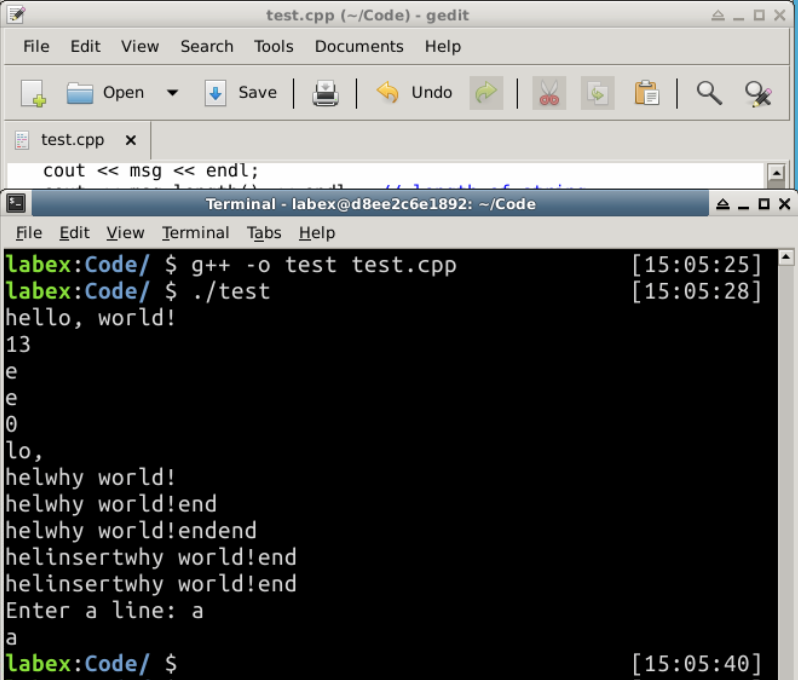
例
/* C++ 文字列関数の例 */
#include <iostream>
#include <string>    // 文字列クラスを使用する
using namespace std;

int main() {
   string msg = "hello, world!";
   cout << msg << endl;
   cout << msg.length() << endl;  // 文字列の長さ
   cout << msg.at(1) << endl;     // インデックス 1 の文字
   cout << msg[1] << endl;        // 上と同じ
   cout << msg.empty() << endl;   // 空の文字列かどうかをテストする
   cout << msg.substr(3, 3) << endl; // 開始位置 3 でサイズ 3 の部分文字列
                                     // pos 3 から始まるサイズ 3 の部分文字列
   cout << msg.replace(3, 3, "why") << endl; // 部分文字列を置換する
   cout << msg.append("end") << endl;        // 後ろに追加する
   cout << msg + "end" << endl;              // 上と同じ
   cout << msg.insert(3, "insert") << endl;  // 位置 3 の後に挿入する

   string msg1;
   msg1 = msg;   // コピー
   cout << msg1 << endl;

   cout << "Enter a line: ";
   getline(cin, msg);   // 1 行の入力を読み取る
   cout << msg << endl;
}
出力:
hello, world!
13
e
e
0
lo,
helwhy world!
helwhy world!end
helwhy world!endend
helinsertwhy world!end
helinsertwhy world!end
Enter a line: a
a
まとめ
文字列は、数値以外のもう一つの重要なデータ型です。このセクションでは、文字列の使い方について説明しました。C++ は文字列処理に役立つ多くの便利なメソッドを提供しており、それらを自在に使えるようになりましょう。